
At a glance
Symptoms
- • Visible blue, white, or yellow sparks or arcs inside the cavity during cooking
- • Popping or crackling sound during a cook cycle
- • Small burn marks or pitting on the cavity wall or ceiling
- • A scorched-looking square or rectangle on one cavity wall (the waveguide cover)
- • Burning plastic or burnt-paper smell during cooking
- • Sparks coming from one specific spot every cycle
Common causes
- • Damaged or burnt waveguide cover — the small beige mica panel on a side wall of the cavity (most common cause)
- • Metal accidentally placed in the microwave (twist ties, foil, decorative trim on a plate, brown grocery bag staples)
- • Foil-lined or metallic-paint dishware (some take-out containers, certain travel mugs)
- • Food splatter or grease build-up arcing on the cavity walls or ceiling
- • Worn or damaged turntable coupler / stirrer cover causing sparking near the floor
- • Failing magnetron with arcing inside the antenna cap (rare — usually accompanied by burning smell and loud buzz)
Safety First — Read Before You Start
- •Unplug the microwave before any inspection or cleaning beyond a quick wipe.
- •Never run the microwave empty or with the door open. Always have at least one cup of water in the cavity if you are testing after a repair — it gives the microwave energy somewhere to go.
- •If you see sparks accompanied by a burning smell, stop using the appliance immediately. Continued operation risks a fire inside the cavity.
- •Do not attempt internal high-voltage component work on a microwave unless you have safely discharged the high-voltage capacitor — the capacitor stores a lethal charge even when unplugged.
- •Do not use steel wool or abrasive scrub pads on the cavity walls — small metal fragments left behind will spark on the next cycle.
Tools & supplies you'll need
- Mild dish soap and warm water
- Soft microfiber cloths
- Replacement waveguide cover (universal mica sheet, $5-15)
- Scissors or hobby knife (to trim mica to size)
- Phillips screwdriver
- Pencil and ruler (for tracing the cover)
- Flashlight (to inspect cavity ceiling)
Step-by-step instructions
Stop the cycle and inspect for obvious causes
If you see sparks, hit cancel or stop. Open the door and look inside. The most common surprise causes are a forgotten metal twist tie on a bread bag, a paper-towel staple, foil from a baked-potato wrapper, or take-out containers with metallic paint or foil liners. Anything metal in the cavity will arc against the walls or against itself. Remove anything suspicious before running another cycle.
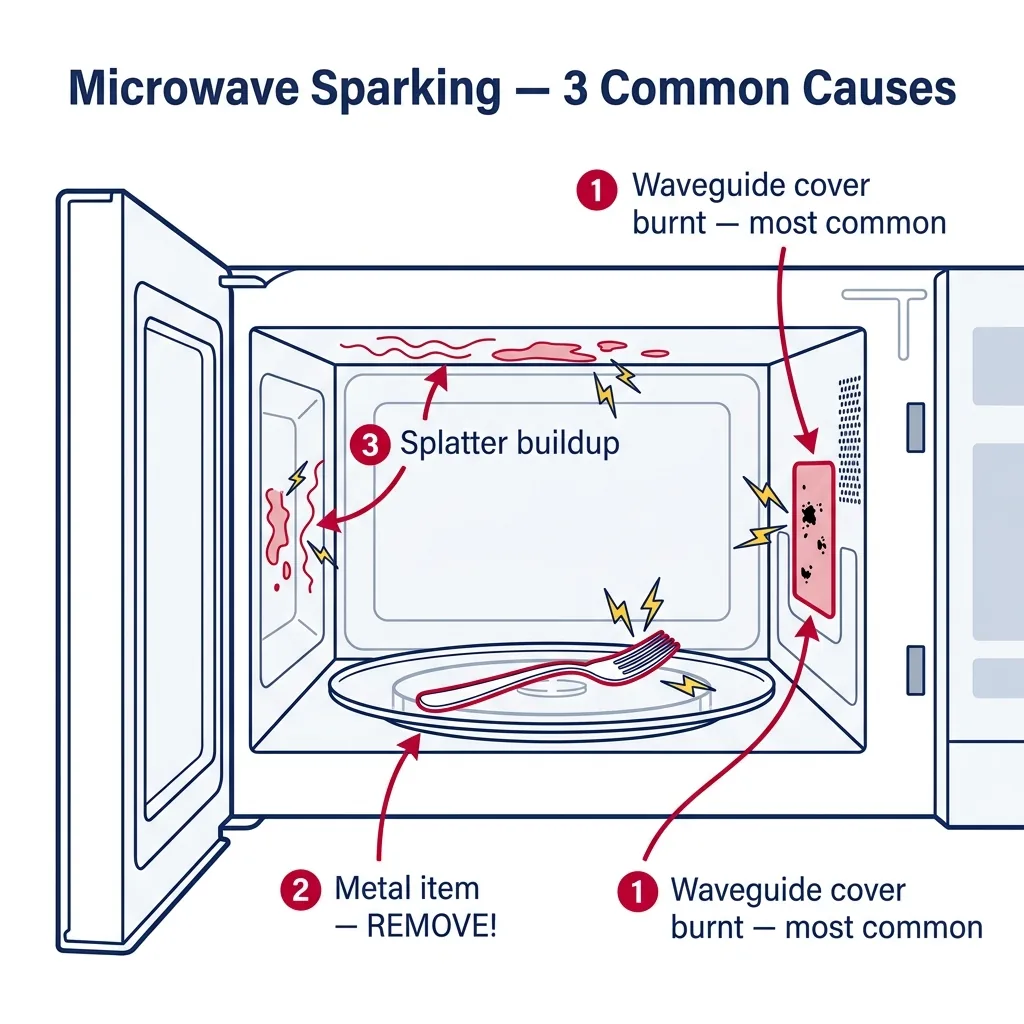
Tip: Some "microwave-safe" travel mugs have stainless rims that are sold as safe, but degrade over time and start arcing. If you bought a new mug recently and sparking started, the mug is the cause.
Clean the cavity thoroughly
Splattered food and grease on the cavity walls and ceiling can carbonize and start to arc on subsequent cycles. With the unit unplugged, wipe down all interior surfaces with mild dish soap and warm water on a soft cloth. Pay special attention to the ceiling — most users skip it. Look for tiny brown pits or carbon dots; these are the arc points and usually need to be scrubbed off, not just wiped. Dry thoroughly before plugging back in.
Tip: For stubborn buildup, microwave a bowl of water with a tablespoon of vinegar for 3 minutes (assuming the unit still works long enough for that), then wipe — the steam loosens everything.
Find and inspect the waveguide cover
Look at the side walls and the ceiling for a small beige or off-white panel, usually 3 by 4 inches, sometimes square. That is the waveguide cover, made of mica. It is supposed to be smooth and a uniform color. If you see brown spots, holes, charred edges, or visible burn-throughs, the cover is the cause of your sparking. Mica is a porous material — once moisture and food penetrate it, it carbonizes and arcs every cycle. The cover protects the slot where microwave energy enters the cavity, but it is replaceable.
⚠ Warning: Do not run the microwave with the waveguide cover removed entirely — the slot behind it must be covered to prevent moisture and food from entering the waveguide.
Replace the waveguide cover
If the cover is damaged, remove it (usually a single screw, or it slides out of plastic clips). Some are factory-cut to size; for universal mica sheets, lay the old cover on the new sheet and trace it with a pencil, then cut with scissors or a hobby knife. The screw hole and any tabs need to align. Reinstall and run a one-minute test with a cup of water in the cavity. The new cover may smell faintly during the first few uses — that is the cover off-gassing and is normal.
Tip: Order universal mica waveguide cover sheets — they are $8-15 and one sheet typically does several microwaves. Brand-specific pre-cut covers exist but cost 3 times as much for the same material.
Inspect the turntable coupler and stirrer
Spin the glass turntable. The plastic or metal coupler underneath should rotate smoothly. If it wobbles or is warped, the turntable can shift during cooking and the rotating support ring (or the food load) can touch a cavity wall and arc. Some microwaves use a stirrer fan (a paddle) hidden behind a plastic cover at the top of the cavity instead of a turntable; if your sparking is at the ceiling, this cover may be loose or melted. Replace any deformed plastic parts with OEM replacements — generic alternatives sometimes do not survive the heat.
Test for arcing in the magnetron antenna (advanced)
If you have replaced the waveguide cover, fully cleaned the cavity, and the sparking still occurs at one specific point — usually right near the waveguide — the magnetron antenna cap may be arcing internally. This shows up as a louder-than-normal buzz combined with sparking. The fix is to replace the magnetron, which is a high-voltage repair with an absolute capacitor-discharge requirement. Most homeowners should call a tech for this stage. As an interim, do not run the microwave; arcing in the magnetron will take it out of service permanently within a few cycles.
⚠ Warning: A failing magnetron is the only sparking cause that requires opening the high-voltage section. If you are not trained on capacitor discharge, do not proceed — call a technician.
Run a final test cycle
Place a microwave-safe mug with one cup of water in the cavity and run for 60 seconds on high. The water should be hot, the cycle should be silent except for normal hum and fan, and there should be no flashes or pops. If the microwave runs cleanly for two consecutive test cycles, the repair is complete. If sparks return, document where they appear (which wall, near what part) — that location tells the next technician where to focus.
Brand-specific notes
Some brands have known design quirks worth knowing about before you start.
Whirlpool
Whirlpool over-the-range models often have the waveguide cover on the right cavity wall. The cover is held by a single Phillips screw and is one of the easiest brands to service. Universal mica works fine — no need for the brand-marked cover.
Samsung
Samsung models (especially SMH and ME series) tend to have waveguide covers that warp from steam exposure when reheating soups. The replacement cover should be fitted with a slight bend toward the cavity — copy the curve of the original.
GE Profile
GE Profile and Advantium models can show what looks like sparking but is actually the halogen lamp flickering through the upper grille — confirm the source before assuming it is microwave arcing. True arcing on GEs is usually waveguide-related.
LG NeoChef
LG NeoChef cavities have a smooth easy-clean coating that resists carbonization, so genuine arcing on these is more often a metal-object problem than carbon buildup. Inspect the cavity floor near the turntable rollers — small scraps of foil sometimes lodge there.
Frigidaire
Frigidaire countertop microwaves frequently arc at the stirrer cover (top of cavity) when the cover loosens or warps. If you see flashes from the ceiling, suspect the stirrer cover before the wall waveguide.
What our techs see most often
Sparking calls almost always resolve in a single visit. About 70% are a damaged waveguide cover or food carbonization on the cavity walls — both housekeeping fixes. The customers most surprised are those with metallic-rimmed serving plates from a recent gift; the rims look decorative but arc immediately. If a sparking call comes in with a burnt-magnetron smell, we route a senior tech because the magnetron itself usually has to come out.
When to call a professional
- → Sparking continues after replacing the waveguide cover and cleaning the cavity thoroughly
- → You see sparks accompanied by a loud buzz and a burning smell — this points to magnetron failure, which requires high-voltage work
- → Sparking caused visible burn-through to bare metal on the cavity wall — the cavity itself may be compromised
- → You are not comfortable identifying or working with mica components inside the cavity
- → The unit is a built-in or trim-kit microwave (Wolf, Thermador, Miele) where removal alone justifies a tech visit
- → You see sparks even with the cavity empty (no food, just an empty cavity, which you should not run for more than a few seconds for diagnostic purposes only)
Frequently asked questions
Is it safe to use my microwave once the sparking stops on its own?
No. Sparking always has a cause — usually a damaged waveguide cover, carbonized food, or stray metal. If the sparking stops mid-cycle it usually means whatever was causing it has finally burnt off, but the underlying damage (such as a holed waveguide cover) remains. Inspect and fix it. Continuing to run a microwave that has sparked risks a cavity fire.
What is a waveguide cover and why does it burn?
The waveguide cover is a small mica panel that protects the slot through which microwave energy enters the cavity. Mica is heat-resistant and microwave-transparent, but it is also porous. Over time, steam and food splatter penetrate the surface, carbonize, and start to arc. A slightly soiled cover can be cleaned; a cover with brown spots, charred edges, or holes must be replaced.
Can I just remove the waveguide cover and not replace it?
No. Without the cover, food, steam, and grease enter the waveguide channel, where they will eventually short out the magnetron antenna or contaminate the unit beyond repair. The cover is cheap (about $10) and replacement is a 5-minute job — never skip it.
Why does my microwave only spark with certain dishes?
The dish almost certainly has metal content. Common culprits are gold-rim trim on china, decorative paint that contains metal pigments, foil-lined take-out containers, and travel mugs with stainless rims. Test with a plain glass measuring cup and one cup of water — if no sparks, the original dish is the cause.
Can sparking damage my microwave permanently?
Yes. Repeated arcing burns the cavity wall, the waveguide cover, and eventually the magnetron antenna. A few cycles of light arcing is recoverable; weeks of ignoring it usually requires replacing the magnetron, which on most home microwaves is not cost-effective. Stop and fix the cause as soon as you notice it.
Related Repair Guides
Microwave Runs but Doesn't Heat Food: Fix Guide
A microwave that runs, lights up, and spins the turntable but leaves food cold almost always points to one of five high-voltage components: the magnetron, HV diode, HV capacitor, a door switch, or a thermal cutout. Some of these are DIY-friendly. Several are not — the HV capacitor stores a lethal charge even when unplugged.
Microwave Buttons Not Working: Membrane and Control Board Diagnosis
When your microwave buttons stop responding, you're usually dealing with a failed membrane switch or a control board issue. Learn how to safely diagnose and replace these components to get your kitchen back in action.
Microwave Door Won't Close or Latch Properly: Fix Guide
A microwave door that won't latch is a major safety hazard and prevents the unit from running. This guide walks you through fixing broken latch hooks, sagging hinges, and misaligned door switches.