
At a glance
Symptoms
- • Baked goods are consistently burning on the bottom or outer edges
- • Recipes are taking significantly longer or shorter than the stated time
- • An independent oven thermometer reads 15°F to 35°F different from your set temperature
- • Inconsistent results when baking delicate, temperature-sensitive items like soufflés or macarons
- • You recently moved to a higher elevation (like the Hollywood Hills or San Bernardino mountains) and your old baking times are suddenly off
Common causes
- • Ensures food safety by cooking meats and poultry to the proper internal temperatures
- • Prevents wasted groceries and frustration from burnt or drastically undercooked meals
- • Compensates for the normal, gradual sensor drift that occurs as your oven's components age
- • Saves energy by preventing the oven from over-firing and running hotter than necessary
- • Gives you predictable, reliable results for holiday baking and everyday meal prep
Safety First — Read Before You Start
- •Never touch the heating elements or oven racks while the oven is hot without thick, heat-resistant oven mitts.
- •Do not attempt to physically bend, scrub, or move the oven temperature sensor probe inside the oven cavity; it is fragile and easily broken.
- •If your oven is gas, ensure you smell no gas before starting a long heating cycle. If you smell gas, turn the unit off, open windows, and call a professional immediately.
- •Do not use a standard meat thermometer to test oven air temperature; they are calibrated for internal food temperatures, not ambient air, and will give wildly inaccurate readings.
- •Always unplug the oven or flip the circuit breaker if you decide to inspect the physical temperature sensor or bake element, to avoid lethal shock.
Tools & supplies you'll need
- High-quality analog or digital oven thermometer ($10-$20)
- Notepad and pen for recording temperature readings
- Heavy-duty oven mitts
- Small flathead screwdriver or Phillips screwdriver (only required for older mechanical dial ovens)
- Flashlight (helpful for reading small numbers on a mechanical dial shaft)
Step-by-step instructions
Purchase and Position a Quality Oven Thermometer
Don't rely on a cheap grocery store thermometer that has been sitting in your drawer for a decade. Invest in a high-quality stainless steel analog oven thermometer or a specialized digital model with a high-heat probe (expect to spend $15-$25). Place the thermometer exactly in the dead center of the oven cavity. This means putting it on the middle rack, equidistant from the left and right walls, and equidistant from the front door and the back wall. The center is where most baking happens and provides the most accurate average reading of the oven's ambient temperature.
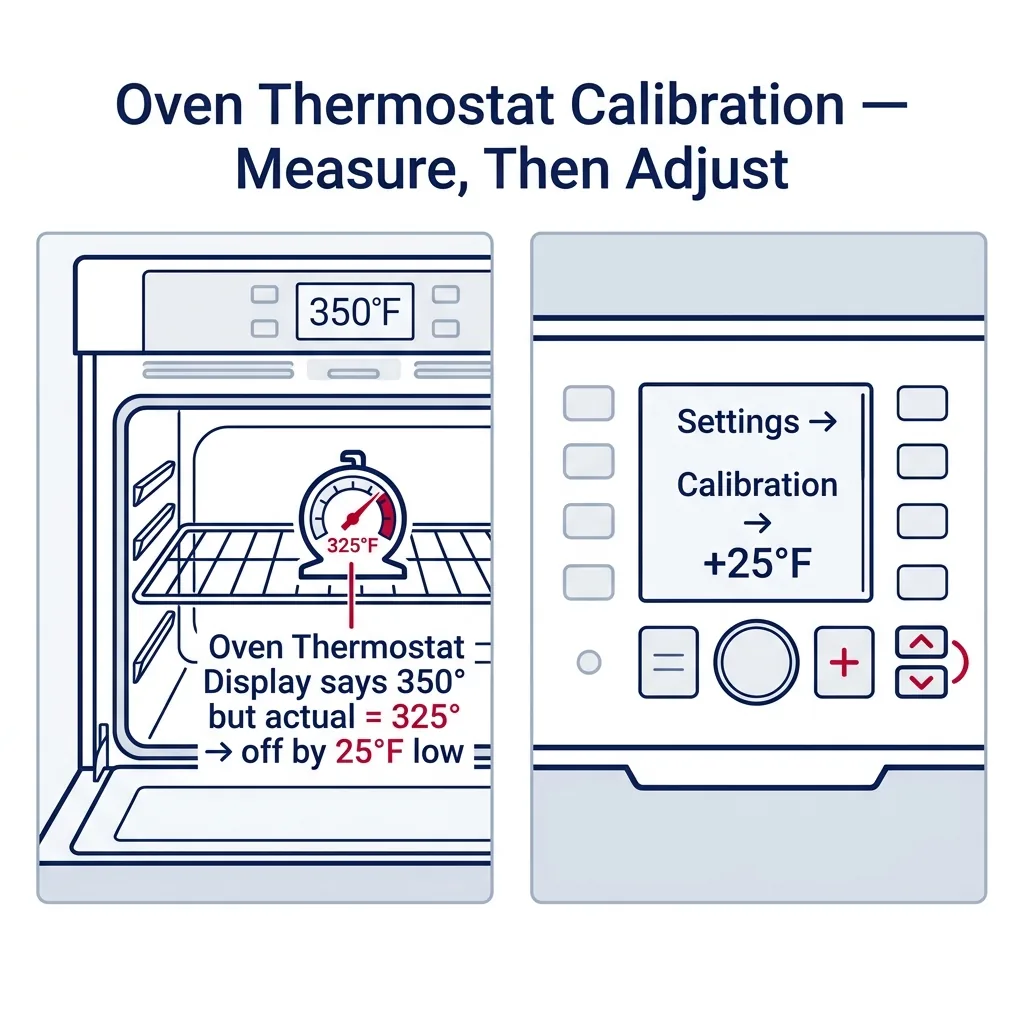
Tip: If you are using an analog thermometer, make sure the face is turned toward the glass window so you can read it without opening the oven door.
Run the Initial Baseline Test
Ensure the oven is completely empty except for the racks and your thermometer. Close the door and set the oven to Bake at exactly 350°F (175°C). Do not use Convection Bake, Roast, or any rapid preheat features, as these activate different elements and fans that will skew your baseline reading. Let the oven preheat completely. Once the oven beeps to indicate it has reached 350°F, do not take a reading yet. The initial preheat cycle always overshoots the target temperature to compensate for the heat lost when you open the door to put food in. Wait an additional 15 to 20 minutes after the preheat beep before taking your first reading.
⚠ Warning: Do not open the oven door during this process. Opening the door can cause a sudden temperature drop of up to 50°F, completely ruining your calibration test.
Record Multiple Temperature Readings
Ovens do not maintain a perfectly flat temperature; they cycle on and off to maintain an average heat. To find your oven's true average temperature, you need to record the highs and lows. Look through the oven window and note the temperature on your thermometer. Take a reading every 10 minutes for a total of 4 or 5 readings (e.g., at minute 20, 30, 40, and 50 after the preheat beep). Write these numbers down on your notepad.
Tip: If your oven door glass is too dirty to see through, use a flashlight to illuminate the thermometer dial, or quickly crack the door for no more than 2 seconds to read it.
Calculate the Calibration Offset
Add all of your recorded temperature readings together, then divide by the total number of readings to find the average. For example, if you recorded 330°F, 325°F, 335°F, and 330°F, your average is 330°F. Since you set the oven to 350°F, your oven is running 20 degrees too cool. This means you need a +20°F calibration offset. Most modern ovens allow you to adjust the temperature by up to +35°F or -35°F. If your average is off by more than 35°F, a simple calibration won't fix it; you likely have a failing temperature sensor or a weak bake element.
⚠ Warning: If your readings fluctuate wildly (e.g., 300°F then 400°F then 250°F), your control board or thermostat is failing and needs professional replacement.
Adjust an Electronic Control Board (Modern Ovens)
The exact button sequence to enter calibration mode varies heavily by brand. Commonly, you will need to press and hold the 'Bake' button for 3 to 5 seconds until the display changes, showing '0' or '00'. Alternatively, look for a 'Settings', 'Options', or 'Broil/Bake' combination (check your owner's manual or our brand notes below). Once in calibration mode, use the arrow keys or the number pad to enter your offset (e.g., +20 or -20). Press 'Start' or 'Enter' to save the setting. The oven's internal computer will now automatically add or subtract this amount from its sensor reading moving forward.
Adjust a Mechanical Thermostat Dial (Older Ovens)
If you have an older oven with a physical temperature knob, ensure the oven is turned off. Pull the temperature knob straight off the front panel. Flip the knob over and look at the back. You should see a metal skirt or a small plate held in place by one or two tiny screws. Loosen (but do not remove) these screws. You will see a small pointer and a scale with hash marks, usually indicating 10°F increments. Rotate the skirt to move the pointer toward 'Cooler' or 'Hotter' based on your calculated offset. Re-tighten the screws and push the knob back onto the shaft.
Tip: Take a clear photo of the back of the knob with your smartphone before you loosen the screws, so you have a reference of the original factory setting.
Verify the Calibration
Once you have entered your offset (electronically or mechanically), it's time to verify the fix. Let the oven cool down completely to room temperature. This might take an hour or two. Once cool, repeat Steps 2 and 3: set the oven to 350°F, wait 20 minutes after the preheat beep, and take a few readings. Your new average should be within 5°F to 10°F of 350°F. If it is, your calibration was successful and you are ready to bake!
Brand-specific notes
Some brands have known design quirks worth knowing about before you start.
Whirlpool & KitchenAid
On many Whirlpool and KitchenAid models, you can enter calibration mode by pressing and holding the 'Bake' button for 5 seconds until the display shows the current offset. On newer touchscreen models, you'll need to navigate through the 'Settings' gear icon to 'Temperature Calibration'.
GE & GE Profile
GE ovens frequently use a two-button combination. You typically need to press and hold the 'Bake' and 'Broil' buttons simultaneously for 3 seconds until the display shows 'SF' (Special Features). Then, press 'Bake' again to access the temperature adjustment, use the number pad to set the offset, and press 'Start' to save.
LG
For most LG ranges, press and hold the 'Bake' button for 3 seconds. The display will show '0'. Use the number pad to enter the desired adjustment. To make the adjustment negative (cooler), press the 'Bake' button again to toggle the minus sign, then press 'Start'.
Samsung
Samsung ovens often require pressing the 'Bake' and '0' (zero) buttons at the same time for 3 seconds. On models with a dedicated 'Settings' or 'Options' button, press it repeatedly until 'Temp Adjust' or 'Therm Calib' appears, then use the arrows or keypad.
Bosch
Bosch 500 and 800 series ovens usually require entering the setup menu. Press and hold the 'Bake' button for 5 seconds, or press 'Settings' and scroll to 'Temp Offset'. Bosch limits the adjustment to ±35°F. If your oven is off by more than that, Bosch recommends replacing the PT500 temperature sensor.
Frigidaire
Press and hold the 'Bake' button for 6 seconds until 'UPO' (User Programmable Offset) appears. Use the up and down arrows to adjust the temperature. Press 'Start' to lock in the new setting.
What our techs see most often
We get a lot of calls from folks in the Hollywood Hills and Pasadena who think their oven is completely broken because their holiday baking failed. More often than not, the oven is just running 20 degrees cool due to normal sensor drift over the years, and a simple 5-minute calibration using the front keypad saves them a $150 service call.
When to call a professional
- → Your calculated temperature offset is greater than 35°F (indicates a failing sensor or weak bake element).
- → The temperature fluctuates wildly during a single bake cycle (e.g., dropping 100 degrees suddenly), which points to a failing main control board.
- → The oven takes longer than 20-25 minutes to preheat to 350°F, suggesting a burned-out heating element rather than a calibration issue.
- → You get an 'F-code' error on the display (like F3 or F4) indicating an open or shorted temperature sensor circuit.
- → You smell raw gas when operating a gas oven, or the bake burner fails to ignite smoothly.
Related Oven Troubleshooting
These troubleshooting guides cover problems this task can help solve.
Oven Broiler Not Working: Causes and Fixes
Oven Not Heating: Diagnose and Fix Both Electric and Gas Models
Oven Self-Clean Not Working: How to Diagnose
Oven Smoking: Why It Happens and How to Stop It
Oven Heats Unevenly: Why and How to Fix
Frequently asked questions
Why is my oven temperature fluctuating while baking?
It is completely normal for an oven to fluctuate. Ovens maintain temperature through a process called hysteresis, cycling the heating elements on and off. If you set it to 350°F, it may heat to 365°F, turn off, drop to 335°F, and turn back on. This is why taking an average of multiple readings over 40 minutes is crucial for accurate calibration.
What if my oven is off by more than 35 degrees?
Most electronic control boards max out at a ±35°F calibration limit. If your oven is consistently 50°F or 100°F off, calibration won't fix it. You likely have a faulty temperature sensor probe (a $20-$50 part) or a failing control board relay. Replacing the sensor is a common repair that typically costs $150-$250 if done by a professional.
Can a bad bake element cause inaccurate temperatures?
Yes. If your bottom bake element has a partial break or increased electrical resistance, it won't output the correct wattage. The oven will struggle to reach or maintain temperature, mimicking a calibration issue. A new bake element usually costs between $30 and $80, plus labor.
Do I need to recalibrate my oven if I live at a high altitude?
If you live in higher elevation areas in California, like Big Bear or Lake Arrowhead, water boils at a lower temperature and air is thinner. While you don't necessarily need to recalibrate the oven's baseline temperature, you will need to adjust your baking times and temperatures per high-altitude recipe instructions. However, if you moved your specific oven from sea level to high altitude, checking the calibration is a smart first step.
How often should I calibrate my oven thermostat?
You generally only need to check calibration once every few years, or immediately if you notice a sudden change in how your baked goods are turning out. Oven sensors drift very slowly over thousands of heating cycles.
Related Repair Guides
Oven Heats Unevenly: Why and How to Fix
Cookies darker on one side of the sheet, cakes that rise lopsided, casseroles bubbling on the back but pale at the front — uneven oven heating is one of the most frustrating issues to diagnose because the oven still "works." The cause is usually a convection fan, a drifted temperature sensor, a weak bake element, or simple operator factors like preheating habits and pan choice. Most fixes are under an hour and many cost nothing at all.
Oven Not Heating: Diagnose and Fix Both Electric and Gas Models
An oven that lights up but never heats — or one that never even powers on the bake cycle — is the second most common cooking-appliance call we get. The diagnosis path is very different for gas versus electric, so this guide covers both. On electric ovens, a broken bake element or a drifted oven sensor accounts for roughly 70% of cases. On gas ovens, a weak igniter is the dominant failure. Most repairs are 1-2 hours and $30-180 in parts.
Oven Broiler Not Working: Causes and Fixes
When your oven's broiler refuses to heat, searing steaks and melting cheese becomes impossible. Discover the common culprits—from burnt-out electric elements to faulty gas igniters—and learn how to troubleshoot the problem safely.