
At a glance
Symptoms
- • Visible blistering, pitting, or a clean break on the bottom heating element.
- • The oven fails to reach the set temperature or takes significantly longer to preheat.
- • Food is consistently undercooked on the bottom or bakes unevenly.
- • The element fails to glow a uniform red when the oven is set to bake.
- • Sparks, smoke, or a loud 'pop' occurred inside the oven during your last baking cycle.
Common causes
- • Restores proper baking temperatures so you don't ruin expensive groceries or holiday meals.
- • Prevents dangerous electrical shorts that can damage the main control board (a $300+ repair).
- • Avoids potential fire hazards from a compromised, sparking element inside the cavity.
- • Saves you $150 to $250 in professional labor costs for a highly accessible, beginner-friendly repair.
- • Ensures even heat distribution, which is critical for baking breads, cakes, and delicate pastries.
Safety First — Read Before You Start
- •Always turn off the dedicated 240V dual-breaker for the oven at your home's electrical panel before starting. Unplugging isn't always possible for built-in wall ovens.
- •Never rely solely on the oven's front control knob being 'Off'. 240V power is still present at the terminals and can be lethal.
- •Wait at least an hour if the oven was recently used; bake elements reach temperatures over 800°F and retain heat for a long time.
- •Do not let the terminal wires slip back into the rear insulation of the oven cavity, as retrieving them is extremely difficult.
- •If you see melted or burnt wire insulation at the terminals, do not proceed. High-temperature wire repair requires specialized ceramic nuts and fiberglass sleeving.
Tools & supplies you'll need
- 1/4-inch hex nut driver or Phillips head screwdriver
- Needle-nose pliers
- Non-contact voltage tester or multimeter
- Work light or headlamp
- Binder clips or clothespins (to secure wires)
- Replacement bake element (specific to your model, typically $25-$85)
Step-by-step instructions
Disconnect the Power
Locate your home's main electrical panel. If you live in an older hillside home in California, you might have a subpanel in the garage or a secondary box. Look for a double-pole breaker labeled 'Oven' or 'Range' (usually 40 or 50 amps) and switch it to the OFF position. If you have a freestanding range that is easy to move, pull it out and unplug the heavy 240V cord from the wall receptacle. To be absolutely certain the power is off, turn the oven to 'Bake' on the control panel; it should remain completely dead.
Tip: Keep a non-contact voltage tester handy to double-check the wires once you expose them. 240V power is unforgiving.
⚠ Warning: Never skip this step. Electric ovens use 240 volts of electricity, which is highly dangerous. Turning off the oven display is not enough to cut power to the element.
Access and Inspect the Element
Open the oven door and remove all the oven racks to give yourself plenty of working room. Set up a work light or wear a headlamp so you can clearly see the back wall of the oven cavity. The bake element is the black, tubular coil sitting on the bottom. Inspect it closely. You are looking for obvious signs of failure: white blisters, severe pitting, or a spot where the metal sheath has completely broken apart. If your oven has a 'hidden bake element' (a flat bottom with no visible coil), you will first need to unscrew and lift out the bottom panel to reveal the element underneath.
Tip: Lay an old towel over the open oven door. This gives you a comfortable place to lean and protects the glass from dropped tools.
Remove the Mounting Screws
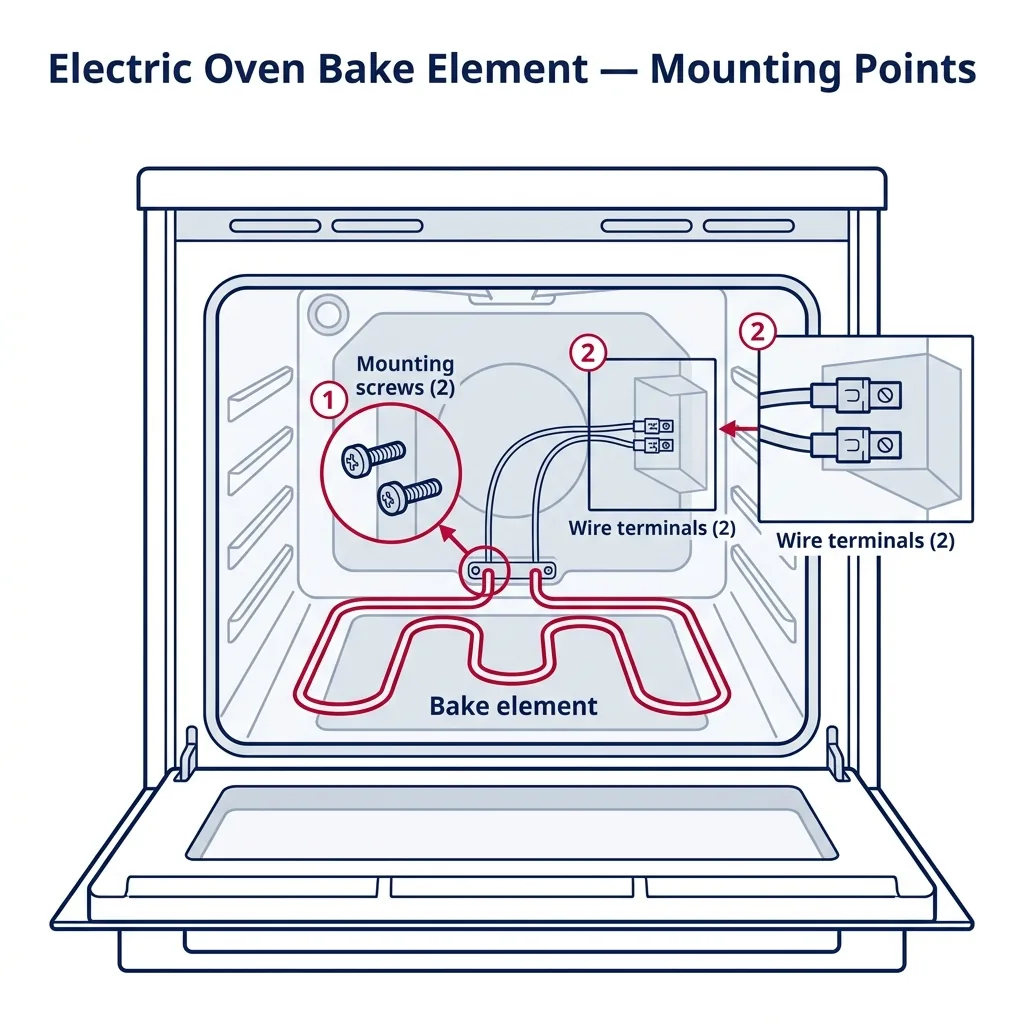
At the back of the oven cavity, the bake element goes through the rear wall and is held in place by a metal bracket. You will typically see two screws holding this bracket to the wall. Using a 1/4-inch hex nut driver (most common) or a Phillips screwdriver, carefully remove these two screws. If your element has small metal feet resting on the floor of the oven, check if they are screwed down as well (though most just rest on the floor). Keep the screws in a safe place, like a magnetic tray.
Tip: Use a magnetic nut driver if you have one. Dropping a screw into the gap between the oven cavity and the rear insulation will turn a 30-minute job into a frustrating hour.
⚠ Warning: Do not aggressively yank the element forward once the screws are out. The wires attached to the back are often very short.
Carefully Disconnect the Wires
Gently pull the bake element forward into the oven cavity. It should come out a few inches, bringing two wires with female spade connectors attached to the element's terminal prongs. Stop pulling as soon as you have enough slack to work. Clip a clothespin or binder clip onto each wire just behind the connector. This prevents the wires from snapping back through the holes into the rear insulation. Using needle-nose pliers, grip the metal spade connector (not the wire itself) and wiggle it side-to-side while pulling backward to slide it off the element's prong. Repeat for the other side.
Tip: If the connectors are stubbornly tight, resist the urge to yank. Gentle wiggling will break the friction without tearing the wire crimp.
⚠ Warning: Inspect the wire terminals once disconnected. If the metal is brittle, heavily corroded (common in coastal California homes), or the wire insulation is charred, you must replace the terminals before installing the new element.
Connect the New Bake Element
Take your new replacement bake element and align it near the back wall. Holding the wires by the clothespins, push the female spade connectors firmly onto the terminal prongs of the new element. They should slide on tightly and require a bit of force to seat fully. A loose connection will cause electrical arcing, heat buildup, and premature failure of the new part. Once both wires are securely attached, remove the clothespins.
Tip: Before pushing the element back into place, double-check that the left wire is on the left prong and the right wire is on the right prong. While bake elements aren't technically polarized, keeping the wiring harness untwisted prevents strain.
Mount the New Element
Gently push the element backward, feeding the wires back through the holes in the rear oven wall. Align the mounting bracket on the element with the screw holes in the oven cavity. Reinstall the two mounting screws using your 1/4-inch hex driver or Phillips screwdriver. Tighten them snugly, but do not overtighten, as you could strip the thin sheet metal of the oven wall. Ensure the metal feet of the element are resting flat against the floor of the oven.
Tip: If the screw holes don't line up perfectly, you can gently bend the mounting bracket on the new element a fraction of an inch to make it fit.
Restore Power and Perform a Burn-Off
With the element securely installed and your tools removed from the oven, close the door. Go back to your electrical panel and flip the 240V breaker back to the ON position (or plug the range back in). Set the oven to 'Bake' at 350°F. You will likely see a small amount of smoke and smell a burning odor—this is completely normal. New heating elements are coated with a protective factory oil that must burn off. Let the oven run for about 15-20 minutes until the smoke clears, then turn it off and replace your oven racks.
Tip: Turn on your kitchen exhaust fan or open a window before you start the test cycle to help clear out the factory burn-off smoke.
Brand-specific notes
Some brands have known design quirks worth knowing about before you start.
GE / Profile
Many modern GE and GE Profile ovens use a 'hidden bake element' located under the floor panel. You'll need to remove the two screws at the back of the floor pan, lift it from the rear, and slide it out to access the element.
Whirlpool / KitchenAid
The factory terminal connectors on these brands can be notoriously tight. Wiggle the spade connectors side-to-side gently with pliers; pulling straight back too hard can rip the wire right out of the terminal crimp.
Samsung
Samsung ranges are known for having very short wiring harnesses. If you pull the element forward and the wires barely clear the back wall, immediately clip a binder clip to the wires so they don't snap back into the insulation.
LG
Many newer LG ranges feature a brilliant blue porcelain interior. Be incredibly careful not to scratch this enamel with your tools or the metal feet of the new element while maneuvering it, as the porcelain can flake and degrade.
Frigidaire / Electrolux
These brands almost exclusively use a 1/4-inch hex head for the mounting bracket. Keep a magnetic nut driver handy, as the angle makes it very easy to drop a screw into the rear cavity.
What our techs see most often
We get dozens of panic calls every Thanksgiving from Los Angeles to Orange County for ovens that just went 'pop' and sparked. Nine times out of ten, it's a blistered bake element that a homeowner could have swapped themselves for $40 if they caught the warning signs early.
When to call a professional
- → The wire terminals connecting to the element are melted, burnt, or severely corroded, requiring high-temperature wire splicing.
- → The wire accidentally slipped completely behind the back wall of a built-in wall oven, requiring the entire heavy unit to be uninstalled and pulled from the cabinet.
- → You have a gas oven. This guide is strictly for electric models; gas ovens require handling delicate hot surface igniters and safety gas valves.
- → Replacing the element doesn't fix the heating issue, which indicates a potential main control board or relay board failure.
- → You are uncomfortable verifying that the 240V power is safely disconnected at the breaker panel.
Related Oven Troubleshooting
These troubleshooting guides cover problems this task can help solve.
Oven Broiler Not Working: Causes and Fixes
Oven Not Heating: Diagnose and Fix Both Electric and Gas Models
Oven Self-Clean Not Working: How to Diagnose
Oven Smoking: Why It Happens and How to Stop It
Oven Heats Unevenly: Why and How to Fix
Frequently asked questions
How much does a replacement electric bake element cost?
Genuine OEM bake elements typically run between $35 and $85 depending on the brand and model. Generic universal elements might be as cheap as $20, but we highly recommend spending the extra money on an OEM part for proper fit, correct wattage, and longevity.
Can I still use my oven if the bake element is broken?
No. Even if your top broiler element still works, a broken bottom bake element often has exposed internal wiring. This poses a severe electrical shock and fire hazard. Leave the breaker off until the part is replaced.
Why did my bake element spark and catch fire?
As heating elements age, the outer metal sheath expands and contracts with every heat cycle. Eventually, it weakens and cracks, exposing the high-resistance inner wire to oxygen. This causes a bright spark, a loud pop, and sometimes brief flames before the wire completely burns out and breaks the circuit.
Do I need to recalibrate my oven after replacing the element?
Usually, no. A new OEM element should return your oven to its factory heating specifications. However, if you notice it's consistently running 15-20 degrees cool or hot after the repair, check your owner's manual for the simple keypad sequence to adjust the thermostat offset.
Is it normal for a brand new bake element to smoke?
Yes, absolutely. New elements have a protective oil coating applied at the factory to prevent rust during shipping. When you first turn it on, it will smoke slightly and smell like burning oil for about 10 to 20 minutes. Open a window or turn on your range hood until it clears.
Related Repair Guides
Oven Not Heating: Diagnose and Fix Both Electric and Gas Models
An oven that lights up but never heats — or one that never even powers on the bake cycle — is the second most common cooking-appliance call we get. The diagnosis path is very different for gas versus electric, so this guide covers both. On electric ovens, a broken bake element or a drifted oven sensor accounts for roughly 70% of cases. On gas ovens, a weak igniter is the dominant failure. Most repairs are 1-2 hours and $30-180 in parts.
Oven Broiler Not Working: Causes and Fixes
When your oven's broiler refuses to heat, searing steaks and melting cheese becomes impossible. Discover the common culprits—from burnt-out electric elements to faulty gas igniters—and learn how to troubleshoot the problem safely.
Oven Heats Unevenly: Why and How to Fix
Cookies darker on one side of the sheet, cakes that rise lopsided, casseroles bubbling on the back but pale at the front — uneven oven heating is one of the most frustrating issues to diagnose because the oven still "works." The cause is usually a convection fan, a drifted temperature sensor, a weak bake element, or simple operator factors like preheating habits and pan choice. Most fixes are under an hour and many cost nothing at all.